# Initial Access via Microsoft Teams External Tenants
***
## Introduction: The Rise of Collaboration App Threat Vectors
The shift to hybrid and remote work has significantly expanded enterprise attack surfaces. With the growing reliance on real-time communication platforms like **Microsoft Teams,** threat actors have found new, under-monitored entry points. Although heavily integrated into the Microsoft 365 suite. Teams is often overlooked from a security perspective. The platform’s capability to interact across tenant boundaries introduces novel risks, especially when external communications are poorly configured.
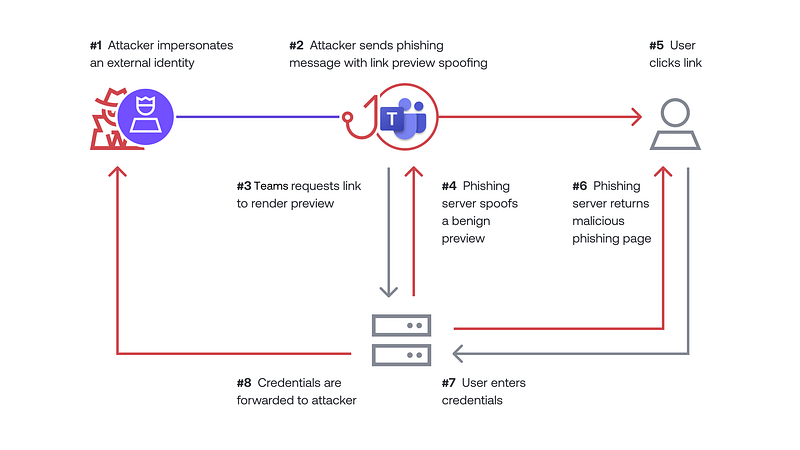
Microsoft Teams phishing attack chain diagram
## Discovering Vulnerable Tenants Through Reconnaissance
### **Why Target Teams Tenants?**
While email security has matured with sophisticated filters and threat intelligence, teams often flies under the radar. Many organizations enable **external access by default** to allow collaboration with vendors, partners, and clients. But these open doors also allow attackers to deliver social engineering payloads or launch internal reconnaissance once access is gained.
### **Recon Techniques**
To uncover which tenants allow external communication, red teams can use open-source tools:
#### **TeamsPhisher**
{% embed url="" %}
```
python3 teamsphisher.py --list-orgs
```
This tool checks if an email domain is reachable
via Teams and provides a list of valid external orgs.
#### **AADInternals**
{% embed url="" %}
```
Get-ADDIntTenantInfo -Domain
```
This command can reveal federation types, MFA policies, and tenant metadata useful for staging future access attempts.
#### **Azure AD and Cloud Recon**
* **Roadtools:** Use roadrecon to dump Azure AD info:
{% embed url="" %}
```
roadrecon.py autu -u
roadrecon.py gather
```
* **OWASP Microsoft Teams Attack Matrix:** Cross-check techniques
{% embed url="" %}
* **Shodan/DNS Recon** for exposed Teams subdomains
{% embed url="" %}
## Delivering Payloads via Microsoft Teams Messaging
#### **Attack Surface in Messaging**
Once a vulnerable tenant is identified, attackers can send rich media messages, including files, HTML code snippets, and links. Given that Teams is a Microsoft application, files shared within it often inherit a level of trust that bypasses traditional security layers. Organizations rarely inspect these messages with the same rigor applied to email.
#### **Payload Types:**
* `.hta` (HTML Application) files embedding PowerShell payloads
* JavaScript (`.js` ) files triggering browser-based exploits
* Word documents with remote template injection
* Malicious OneDrive link redirecting to staged payloads.
* OAuth authorization links mimicking Microsoft login for phishing tokens
#### **Example**
```
python3 teamsphisher.py --file payload.hta --message "Latest report attached" --target jane.doe@company.com
```
Once delivered, the payload is stored within Teams’ conversation history and may be synced across devices, increasing the attack footprint.
## **Vulnerabilities Elevating the Threat**
* **CVE-2023–23397:** NTLM credential leak via calendar invite.
{% embed url="" %}
* **CVE-2024–25234:** RCE through link previews
{% embed url="" %}
* **CVE-2025–29988:** OAuth bypass in Teams Web embedded browser
{% embed url="" %}
* **Zero-day Observed:** Teams plugin XSS via crafted adaptive cards (reported in April 2024)
## Token Replay and Trust Exploitation in Microsoft 365
### **Token Abuse Explained**
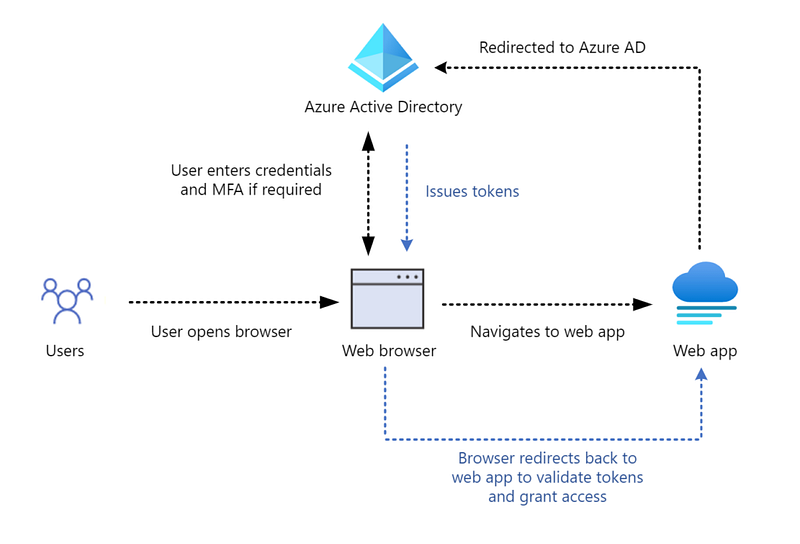
Microsoft Teams uses **Azure AD OAuth2 tokens** to authenticate users across services. Attackers can hijack these to impersonate victims, even across different apps like Outlook, SharePoint, or OneDrive.
{% embed url="" %}
Common methods of abuse include:
* Session token extraction via browser DevTools.
* OAuth refresh token replay using intercepted `aadsts` error codes.
* Cross-Site Scripting (XSS) in embedded Teams apps to steal tokens.
* OAuth app phishing using `response_type=token` to steal bearer tokens
```
Invoke-RestMethod -Uri "https://graph.microsoft.com/v1.0/me" -Headers @{Authorization = "Bearer $token"}
```
### **AWS / GCP/ Azure Cross-Cloud Token Risk**
* Azure token leaked from Teams chat reused in AWS Cognito federated login (simulated in GCP’s **BeyondCorp** labs)
* Session replay working across multiple Microsoft services if Conditional Access is poorly configured.
Diagram showing token hijack across M365 apps
## Building a Realistic Lab for Teams Attacks
### **TryHackMe Labs**
**Room:** Azure Cloud Labs + custom Teams Lab
* Two Azure AD dev tenants
* External communication enabled
* Token observation using browser DevTools
{% embed url="" %}
### **Hack The Box Enterprise Cloud**
* Module: Cloud Federation + Collaboration Attacks
* Simulate cross-tenant token abuse, Teams-based malware delivery
{% embed url="" %}
### **VulnHub Scenario**
* Build internal Teams clone using Mattermost and GitLab OAuth
* Inject custom token replay logic via malicious OAuth scope
### **Azure Cloud Lab**
* Leverage Azure Free Tier for Teams App creation
* Simulate token interception and refresh token abuse
### **GCP and AWS Cross Cloud Risk Labs**
* **GCP:** Setup `Google Workspace Identity`federation with Azure AD
* **AWS:** Use AWS SSO with Azure Identity as IdP, test token misconfiguration.
## Detection Challenges and Evasion Techniques
### **Limited Logging in Teams**
Teams lacks granular logging. To detect payload delivery:
* Enable Unified Audit Logs (UAL) in Microsoft 365.
* Deploy Microsoft Defender for Endpoint EDR sensors.
### **Evasion in the Wild**
* **Obfuscate payloads** in Base64, ROT13, or split strings.
* **Bypass Teams malware filter** using a password-protected achieves.
* **Use OAuth phishing** to avoid file scanning altogether.
## Hardening and Mitigation Strategies
### **Admin-Level Controls**
* Disable or scope external access: `Teams Admin Center > Org-wide settings > External access`
* Enforce MFA for all external communication
* Apply Conditional Access based on tenant trust
### **End-User Education**
* Encourage users to report unexpected Teams messages
* Treat unsolicited file shares as suspicious
* Block auto-accept of file previews
### **Monitoring Tools**
* **Microsoft Defender for Office 365:** Detect anomalous Teams behavior
* **Cloud App Security (MCAS):** Track cross-tenant file and message flow
* **SIEM:** Integrate UAL logs for token behavior correlation.
## Real World Example
A real world example unfolded during a live internship session on Microsoft Teams.
Due to a misconfiguration, every intern was unknowingly granted full presenter/admin permissions. This opened the door for:
* Muting instructors mid-lecture
* Randomly kicking participants
* Causing confusion and panic among organizers, some even suspected external compromise tools.
This situation highlights exactly why collaboration apps should not be treates as mere communication tools, but as critical attack surfaces. In environments with cross-tenant access, weak role separation, and poor logging, these platforms can become a threat actor’s playground.
If an intern can simulate such chaos in a controlled setting, imagine the implications in enterprise scenarios.
---
# Agent Instructions: Querying This Documentation
If you need additional information that is not directly available in this page, you can query the documentation dynamically by asking a question.
Perform an HTTP GET request on the current page URL with the `ask` query parameter:
```
GET https://aenosh-rajora.gitbook.io/cyber-codex/initial-access-via-microsoft-teams-external-tenants.md?ask=
```
The question should be specific, self-contained, and written in natural language.
The response will contain a direct answer to the question and relevant excerpts and sources from the documentation.
Use this mechanism when the answer is not explicitly present in the current page, you need clarification or additional context, or you want to retrieve related documentation sections.